
Agentic Engineering: Lessons Learned Vol. 2
Six months ago, we shared our first lessons learned with agentic engineering. Since then, we’ve shipped real features, refactored infrastructure, screamed at agents — and discovered which of our original recommendations actually survived contact with production.
What Actually Stuck from Vol. 1
Most of our original advice still holds. Context engineering remains the core skill and knowing the basic pitfalls like Context Poisoning, Context Distraction, Context Confusion, Context Clash are key to managing your agent’s context effectively. Having those basic principles in mind is essential to know what to expect and avoid delegating tasks that are likely to fail.
Subagents: The context firewall
In Vol. 1, we recommended: “Subagents work best as researchers, not implementers.” While the first part of that statement still holds, we’ve found that the second part is more nuanced.
The better mental model is to think of subagents as context firewalls rather than scoping them down to specific actions. They excel at isolating specific tasks and preventing context pollution, but that doesn’t necessarily mean they can only read.
Research Tasks
By nature, read-only/research tasks lend themselves well to subagents because they often take a lot of grepping, log analysis, or documentation reading—all to produce a much smaller insight that is actually needed.
We use them all the time for that kind of work as you can also spawn them in parallel without producing conflicts.
For example, we have an ops-investigation skill, that given your prompt about a specific issue on production, spawns subagents to check logs and metrics in grafana, search through sentry issues and recent deploys in parallel.
Since also our Infrastructure as well as the code is in the monorepo, the subagents can also grep through the codebase to produce a distilled report of their findings. This is a huge time saver and allows us to get to the root cause of issues much faster.
Write Tasks
But with well structured plans, also subagents can be used for write operations - the key theme is here phased implementation. When the main agent ensures, that the phases can be implemented in isolation, with clear boundaries and pre-coordination, then subagents can be trusted to implement those phases without causing chaos in the main context. Even better, it still allows you to steer the session as the main agent still holds all the context and thus enables you to iterate and give feedback on the subagent’s implementation without losing the overall plot.
The key learning: be deliberate about write operations, but don’t avoid them entirely. The boundary between “safe” and “risky” writes is more nuanced than a simple read/write distinction.
💰 One more thing: Since you can control the model of the subagents, it is very easy to use cheap models for digging through particularly noisy tasks like log analysis, and then feed the distilled insights into the main agent that can be a more expensive model. This is a great way to optimize token usage while still getting valuable insights.
Side quests: Session Forking and Branching
Just like you’re used to branch a git repository when you want to experiment with a new feature or fix a bug, you can also branch your agent session. This is especially useful for debugging and investigation tasks that require a lot of context and exploration, but you still have the main session going on that should be clean. There are many ways to do this and we’re seeing more and more tools supporting this pattern natively, but the core idea is the same: fork the session to isolate the side-quest work from the main implementation context. Especially Pi provides sessions as a tree, which allows you to nicely control the branching of sessions.
Some techniques we use are:
Handoff: create a handoff file as an artifact with the relevant context. Then spawn a new session and load that file into context. Note that you actively compress the context (which can be good or bad depending on the task).
---
title: "Handoff File"
---
graph LR
    A["🧠 Main Session"] -->|writes context| F["📄 handoff.md"]
    F -->|compressed load| B["🧠 New Session with handoff knowledge"]
    A --> note1["clean, proceed with next task "]
Fork: Use the fork or branch feature of your coding agent. That way both sessions live and can proceed in parallel.
---
title: "Fork / Branch"
---
graph TD
    A["🧠 Main Session"] --> B["🔀 Fork!"]
    B --> C["🧠 Main Session\n(keeps building)"]
    B --> D["🔍 Debug Session\n(goes exploring)"]
    C -.- note1["production work goes on 🏗️"]
    D -.- note2["chaos contained 🔥, kill when done"]
Rewind: Mark your session, then dive into the investigation, and then rewind to the marked point. Like time travel, the conversation is restored but a bug might be fixed. Ensure to keep the code changes. Note that this is not parallelizable.
---
title: "Mark & Rewind (Time Travel)"
---
graph LR
    A["🧠 Session"] --> B["🔖 Mark"]
    B --> C["🕵️ Investigate"]
    C --> D["🐛 Fix bug"]
    D --> |rewind to|A
Side query:
- use
/btwor similar commands to ask or verify things with the agent on the current context.
---
title: "/btw — Quick Side Query"
---
graph LR
    A["🧠 Deep in\nimplementation"] --> B["/btw 🤔"]
    B --> C["💬 Quick answer"]
    A --> D["main work"]
Simple context management. Once you have a valuable context built up, protect it.
Planning is non-negotiable, even for small tasks
This was already a strong recommendation in Vol. 1, and after six more months it’s become our hardest rule: no plan, no implementation. We’ve seen enough agent sessions derail mid-task to know that skipping the plan is always a false economy — the time you “save” comes back as wasted tokens and broken context.
For larger work, we follow a research/spec → plan → implement flow. But even for smaller tasks, a simple grounding step — spawning an explore subagent to survey the relevant code before touching anything — makes a huge difference in our experience. It forces the agent to build a mental model first, instead of guessing and course-correcting later.
This also means that any tool that cannot produce or assist in producing a proper plan is not a tool we can use for anything but trivial tasks. Autocomplete-style copilots are great for boilerplate and line-level suggestions, but the moment a task requires understanding across files or making architectural choices, you need a planning step they simply don’t offer.
In the next months, we will map and extend our Software Development Lifecycle with clear phases and checkpoints, and enforce that agents follow that process.
Agent ready codebases
This is obviously an evergreen and as it basically controls what the agent “sees” when running in your project, so its impact cannot be overstated. And as your project evolves, an agent ready codebase must be maintained and cared for like a garden.
Key recommendations:
- Use a monorepo if you can 🤓 While there are other techniques for multi-repo setups (see Dexter Horthy’s post), a mono-repo simplifies setup and context not just for you but also for the agent
- Clean
AGENTS.md. Do not ai-slop this crucial file. It shouldn’t be longer than 100 lines and as it is read every time, each line must be inspected and it must survive the test of time. - Commands:
- Fast commands: To get fast feedback loops, you need fast commands. Ensure testing is fast, linting is fast. We optimize our linting and typecheck setup regularly (looking at you ts-go and oxlint). If you have many distinct packages, caching outputs like turborepo or nx can be a game changer.
- Clear commands: There should be a unified way to run tests, linters, type checkers, and other common tasks. Don’t reinvent the wheel for each package and follow conventions that agents understand.
- Non verbose commands: Ensure a passing test suite is not blurting out thousands of lines of output. Agents need to see the signal, not the noise. If your test runner is too verbose, consider switching or configuring it for cleaner output. See Context-Efficient Backpressure for Coding Agents
- Manage your MCPs: Even though claude has an mcp loading tool that dynamically loads mcps on demand once you cross a certain initial context threshold, we mostly use skills to connect to external tools and APIs. That way we can tailor them to our needs and control the context better.
There are also some readiness models going around and until we have a more mature one, this Agent Readiness Model by Factory is a general nice overview.
| Level | Name | Description | Example Criteria |
|---|---|---|---|
| 1 | Functional | Code runs, but requires manual setup and lacks automated validation. Basic tooling that every repository should have. | README, linter, type checker, unit tests |
| 2 | Documented | Basic documentation and process exist. Workflows are written down and some automation is in place. | AGENTS.md, devcontainer, pre-commit hooks, branch protection |
| 3 | Standardized | Clear processes are defined, documented, and enforced through automation. Development is standardized across the organization. | Integration tests, secret scanning, distributed tracing, metrics |
| 4 | Optimized | Fast feedback loops and data-driven improvement. Systems are designed for productivity and measured continuously. | Fast CI feedback, regular deployment frequency, flaky test detection |
| 5 | Autonomous | Systems are self-improving with sophisticated orchestration. Complex requirements decompose automatically into parallelized execution. | Self-improving systems |
We’d place ourselves somewhere between level 3 and 4 — our processes are standardized and enforced through automation, but we’re still working toward systematic flaky test detection.
Frontend Validation: Closing the Visual Feedback Loop
In Vol. 1, we focused heavily on backend workflows as they’re more straightforward to validate with existing tools. Frontend work, however, presents a unique challenge: How do you validate visual output without a human in the loop?
For a while, agentic frontend coding lagged behind in our team. The agent can write frontend code, but without visual feedback, they can’t validate if it works. This creates a cumbersome loop:
- Agent writes component
- You open browser, check it
- Report back: “The button is misaligned” or pastes a screenshot
- Agent adjusts
- Repeat
This manual validation step becomes a bottleneck and drains the attention from the developer, who has to act as a proxy for the agent’s eyes. Luckily, browser use tools are evolving rapidly and we’ve experimented with:
- Claude + Chrome extension: Super easy to set up and use, but token-hungry. A great starting point to see what is possible.
- agent browser: Agent-friendly (headless) browser use CLI. Offers structured snapshot and clear output, cuts a lot of noise. Has a nice auth vault in place, too. Our champion at the moment.
- dev-browser skill: This was the first tool we used on our CI. Less token-hungry than the mcps and easy to extend with own scripts.
The first time it fixes a bug completely on its own by verifying its work was a magical moment✨. But as often with magical AI moments, it quickly became the new normal and we quickly faced new challenges 😅:
- headless environments: to fully leverage frontend validation, we want to bring it into our CI pipelines
- token usage: navigating a browser and validating screenshots is token intensive, so we need to be strategic about when to use it or how to isolate it. Tools like agent-browser are great as they have baked-in backpressure compared to the playwright-mcp.
- auth and setup scripts: You want to give the agent the ability to start from a clean and well-designed state.
- missing product knowledge: It’s very tedious if the agent needs to “explore” the product by UI again, to know how to do certain things. For example, it should of course detect and use the buttons on the page, but it shouldn’t learn on the fly that it needs to go to configuration to create form template in order to create forms in our software. This must either be provided as knowledge (see next section) or ruled out as a task for the agent.
We’re still refining this, but it’s a massive leap forward.
Missed potential: Skills and documentation
We were kinda slow adopters of skills, as it was not entirely clear to us how they fit into our existing commands and tooling. Now, we’re building more and more skills specifically tailored for our use cases. Some general recommendations:
- Basic:
- keep the SKILL.md focused up to max 200 lines. For everything else, use progressive disclosure with
references. - skills are not just markdown files. Put your agent-friendly or vibe-coded helper scripts there.
- the
descriptionfield in the metadata is crucial. It is for the agent, not for humans, to check when to invoke it. - speaking of invocation: Don’t expect agents to call skills autonomously.
- keep the SKILL.md focused up to max 200 lines. For everything else, use progressive disclosure with
- Skill content:
- Everything that you notice you have to explain repeatedly to the agent, could be a good candidate for a skill.
- Project-specific patterns or how to deal with certain processes can be nicely encapsulated in skills. Often you find yourself following an implicit or maybe explicit process in doing things, e.g.
spec -> plan -> implement -> validate -> review, babysit PRs, bug-hunting involving several systems etc. Take your time and document them in skills and maybe later into entire processes!
Just having process steps documented in an actionable way that before were parts of tribal knowledge or onboarding guides is a huge win. Note that they do not replace documentation though, as specifically the intent in why you are doing things a certain way is mostly not captured.
In our company, there is still a lot of potential left in encoding our SDLC and product knowledge, but equally important non-technical information like company missions, processes, sales and customers that is accessible and usable to agents.
Beyond Coding: Prototyping and Idea Validation
This one is obvious, especially for vibe coders, but this pattern emerged organically: Coding agents are excellent for rapid prototyping and exploring ideas. We use coding agents not just to ship features and smash bugs, but to do:
- UI/UX prototyping: “Build me a quick playground prototype of this dashboard concept” → Full interactive mockup in minutes, awesome for validating design ideas with customers
- Idea validation: “Does this architectural approach even work?” → Agent builds a proof-of-concept or grills your ideas
- Throwaway exploration: Testing libraries, frameworks, or patterns without committing to them. Or even more modern, follow Karpathy’s autoresearch pattern
One tool that’s become a staple for us is the Claude Code Playground skill. It’s a skill you can install in Claude Code that generates self-contained, single-file HTML playgrounds — complete with visual controls, live preview, and natural-language prompt output. No external dependencies, no build step.
The workflow is dead simple: you describe what you want to explore — “Create a playground for button design styles”, “Build an interactive color palette explorer” — and the skill generates an interactive HTML page you can open in your browser. Tweak parameters, see results instantly, copy out a prompt or config when you’re happy. Need to show a customer something tangible? “Build a clickable prototype of the onboarding flow with variants.” In minutes you have something real to point at, not a slide deck.
That way, the question “is this even worth prototyping?” basically disappears. You can just… do it. In an hour you’ve tried three approaches, learned which one sucks, and moved on.
Just make sure you’re the one calling the shots on what that insight means. Use your human brain where it counts: taste, direction, and the decisions that actually matter long-term.
Making reviews less painful
With code being generated in a fast and iterative way, we suffered like many others from the “review bottleneck”. Pumping out more code means you need to review more code. What is especially crucial for us is to keep the mental alignment in the team - it is rarely about small lines of code but the overall approach, how it fits into the existing codebase and which tradeoffs are made. We did not give in to the temptation to just publish agent’s code without review like some do, but instead we looked into how to make reviews more efficient and less painful.
What we’ve done so far:
- Strict CI: Same strict checks for every PR, no exceptions. The first quality gate is the CI, not the reviewer. If it doesn’t meet the bar, it doesn’t even reach human eyes.
- Agents for local self-review: Before you even submit a PR, ask the agent (fresh session, at best another capable model) to review the code. This catches many low-hanging issues and improves the quality of the initial submission, so your colleagues can focus on higher-level feedback
- Code review on CI: We have a CI job that runs an agent to review the PR diff and provide feedback. This is not meant to replace human review but to catch obvious issues and provide a first pass of feedback. This can be your CodeRabbit or GH Copilot integration for example.
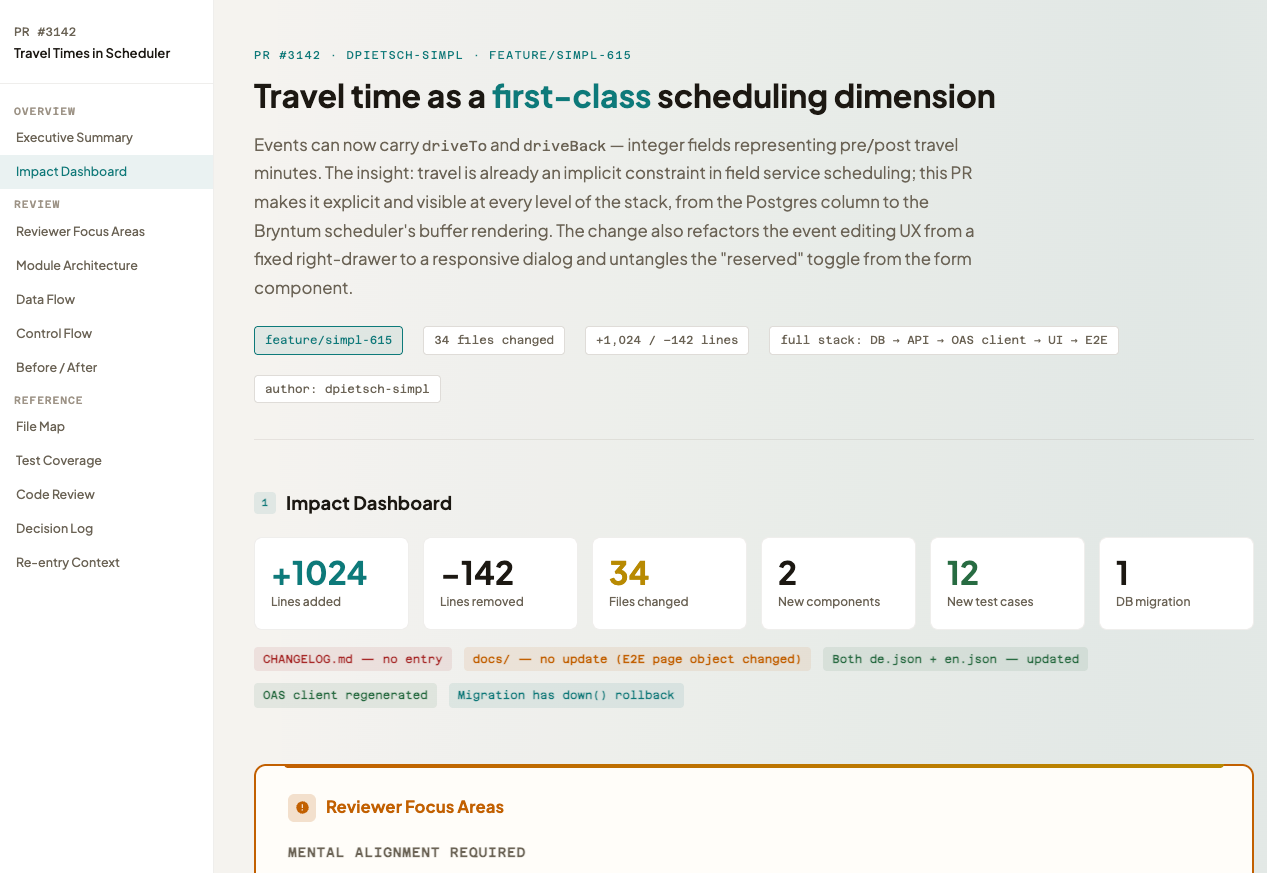
- Human friendly Output: Leveraging Nico Bailon’s visual-explainer skill, we can flag certain PRs in need of a human friendly and visual explanation of the changes. The agent then produces a html page with a visual diff and natural language explanations of the changes, which is much easier and pleasant to review than raw code diffs, especially to get started.
Outlook: Organizational impacts
We hope this was a useful peek into our learnings and practices with agentic engineering. As we continue to integrate these tools into our workflows and adjust them, the elephant in the room is how our organizational structures and processes will need to evolve to fully leverage the potential of agentic tools. Some early thoughts:
- Merging of job roles: With cheap prototypes and faster iteration, classic roles like “product manager”, “designer”, “developer” might blur as individuals can quickly prototype and validate ideas across disciplines.
- Quality: With faster iteration, how do you ensure quality and maintainability?
- Bottlenecks: Your team might have the same amount of people but they can do much more. Where are the new bottlenecks? How do you identify and address them?
So stay tuned for future posts where we will dive into these topics!